For the complete documentation index, see llms.txt. Markdown versions of all docs pages are available by appending .md to any docs URL.
Amazon Bedrock
Verified : Code examples on this page have been automatically tested and verified.Route agentgateway LLM traffic to foundation models on Amazon Bedrock.
Configure Amazon Bedrock as an LLM provider in agentgateway.
Note
Bedrock excludes cached tokens from the input count that it reports. The CEL field llm.inputTokens adds them back, so telemetry, metrics, and token-based limits count a cache-heavy request higher than the number that Bedrock reports. To read the Bedrock number itself, use llm.providerInputTokens. For more information, see Token usage fields.
Note
Agentgateway accepts requests in one of the supported API formats (such as the /v1/chat/completions request body shape) and returns responses in that format.
Agentgateway translates between these formats and Bedrock formats internally using Bedrock’s Converse API.
Directly sending Converse or Invoke request shapes are not directly supported; see passthrough for more information if you need these APIs.
Bedrock conversion turns the prompt-cache markers in /v1/messages and /v1/chat/completions requests into Bedrock cache points, including markers on content that the conversion does not send. In /v1/messages requests, the Anthropic cache_control.ttl value becomes the TTL of the cache point. For where a marker on dropped content goes, see Converting to the Bedrock Converse format. In /v1/chat/completions requests, a text part that contains only whitespace is not sent, and the marker on that text part moves to the end of the content before the text part in the same message.
Authentication
Before you can use Bedrock as an LLM provider, you must authenticate by using the standard AWS authentication sources.
Agentgateway will automatically detect the local ambient credentials, but these can be explicitly configured with auth.aws.
Configuration
You can add the model in the UI or in your configuration file.
To add the model in the UI, follow these steps. The steps create the same model as the Config file tab.
Set up AWS credentials in the terminal where you run agentgateway, such as an AWS profile or environment variables.
Create a configuration file with an empty
llmsection, and start agentgateway in the same terminal. Without anllmsection, the UI does not show the LLM > Models page.cat > config.yaml <<'EOF' # yaml-language-server: $schema=https://agentgateway.dev/schema/config llm: models: [] EOF agentgateway -f config.yamlOpen LLM > Models, such as http://localhost:15000/ui/llm/models, and click Add model.
From the Provider dropdown, select Amazon Bedrock.
Keep the default
bedrock/*in the Incoming model match field.Keep Ambient for the AWS credentials. To enter an access key instead, select Static. This option writes the key to an
auth.awsblock.For the AWS region, enter or select
us-west-2.From the Bedrock endpoint dropdown, select Prefer Runtime. The UI preselects Prefer Mantle for a new Bedrock model, and saves the choice as
params.bedrockEndpointPreference. For more information, see Bedrock Mantle.For Outgoing model, keep Strip bedrock/. This option removes the
bedrock/prefix before the request is forwarded. To send every request to one model instead, select Explicit, and enter the model ID. This option setsparams.model.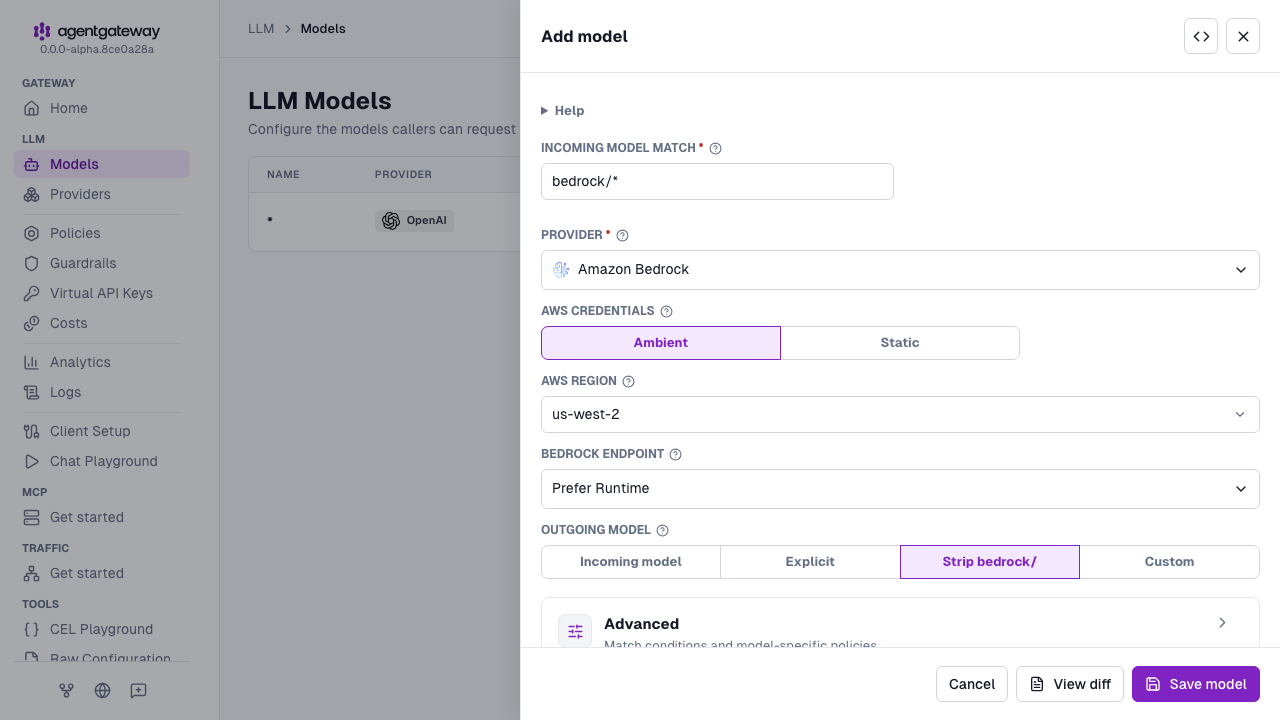
Click Save model.
The UI writes bedrockEndpointPreference: runtimePreferred in addition to the fields in the Config file tab. Runtime is also the default when the field is not set, so both configurations behave the same.
Whether the UI can save depends on your storage mode. For more information, see Save changes from the UI.
Passthrough
If your applications directly use the AWS Converse or Invoke APIs, Agentgateway cannot translate these APIs to other providers.
However, it can pass the request through to Bedrock itself following the passthrough approach.
This can provide telemetry data for these requests.
First, setup passthrough mode:
# yaml-language-server: $schema=https://agentgateway.dev/schema/config
llm:
  models:
  - name: us.anthropic*
    provider: bedrock
    params:
      awsRegion: us-west-2
    passthrough: detect
Then, you can send native Converse and Invoke requests:
import json

import boto3

client = boto3.client(
    'bedrock-runtime',
    region_name='us-west-2',
    endpoint_url='http://localhost:4000',
)
response = client.converse(
    modelId='us.anthropic.claude-sonnet-4-6',
    messages=[
        {
            'role': 'user',
            'content': [{'text': 'give 1 word answer'}]
        }
    ]
)
print('converse response:')
print(response)Note
Model translations are not supported with passthrough, so avoid using a model match like aws/*, as it cannot be transformed.
Claude Platform on AWS
See here for connect to Claude Platform on AWS.
Bedrock Mantle
Bedrock serves models on two API surfaces: the Runtime endpoint, which carries the Converse and Invoke APIs, and the Mantle endpoint, which carries the native OpenAI and Anthropic APIs. Some models are served on only one of the two.
For chat requests, the endpoint is chosen per model from the runtime and mantle tags in the model cost catalog. The built-in catalog that ships with agentgateway already tags the Amazon Bedrock models. To tag models that are newer than your agentgateway version, run agctl catalog import. Its default sources include aws-bedrock-mantle, which reads the tags from the AWS model cards. A model with neither tag falls back to the preference alone.
Set params.bedrockEndpointPreference to choose how the tags are applied. You can set the preference in the UI or in your configuration file.
- Open LLM > Models, and click the Edit model icon for the Bedrock model. To create a model, click Add model, and select Amazon Bedrock from the Provider dropdown.
- From the Bedrock endpoint dropdown, select an option. Prefer Runtime writes
runtimePreferred, Prefer Mantle writesmantlePreferred, Runtime only (advanced) writesruntimeOnly, and Mantle only (advanced) writesmantleOnly. - Click Save model.
The Bedrock endpoint dropdown is also in the Add provider drawer on the LLM > Providers page.
| Value | Endpoint selection |
|---|---|
runtimePreferred | Use Runtime, except for a model tagged mantle but not runtime. This value is the default. |
mantlePreferred | Use Mantle, except for a model tagged runtime but not mantle. |
runtimeOnly | Always use Runtime, whatever the tags say. |
mantleOnly | Always use Mantle, whatever the tags say. |
Inline Bedrock guardrails are available only on route and backends AI backends, through the ai.provider.bedrock.guardrailIdentifier and guardrailVersion fields. Those backends set the preference in ai.provider.bedrock.endpointPreference. llm.models and llm.providers have no inline guardrail fields, and a params.guardrailIdentifier setting fails to load with an unknown field error. An inline guardrail requires the Runtime endpoint:
- If either guardrail field is set together with
mantlePreferredormantleOnly, the configuration fails to load withBedrock guardrails cannot be used with MantlePreferred or MantleOnly. - With
runtimePreferred, an inline guardrail keeps requests on Runtime even when the model tags would choose Mantle.
To apply Bedrock Guardrails with either endpoint, including on llm.models, use a Bedrock Guardrails prompt guard in guardrails.request[].bedrockGuardrails or guardrails.response[].bedrockGuardrails.
The Kubernetes API takes the same four values capitalized, such as RuntimePreferred, under spec.ai.provider.bedrock.endpointPreference. A value that you copy from one mode to the other fails to load.
In the agentgateway UI, the LLM Models and LLM Providers editors set bedrockEndpointPreference to mantlePreferred when you change an entry’s provider to Amazon Bedrock. An existing Bedrock entry that does not set bedrockEndpointPreference shows Prefer Runtime in the Bedrock endpoint selector and keeps the runtimePreferred default. The UI writes the field only after you choose a value and save the entry.
The preference applies to four route types: chat completions, messages, responses, and Anthropic token counting. Every other route type ignores the preference and uses a fixed endpoint.
- Model listing always uses Mantle.
- Embeddings, realtime, Gemini token counting, detection, passthrough, and content generation always use Runtime.
- Reranking uses a separate Bedrock agent-runtime host rather than the Runtime or Mantle endpoint.
Whether the preference changes the request format that a model accepts depends on the endpoint that it selects. A model that resolves to Runtime accepts the Bedrock Converse format only, and its chat format tags do not apply. A model that resolves to Mantle accepts the formats in its tags, except for anthropic.claude* models, which always take the Anthropic Messages format. For more information, see Chat format tags.
When a /v1/messages or /v1/messages/count_tokens request reaches Bedrock Mantle in the Anthropic Messages format, the request keeps the client anthropic-version header. If the client sends no version header, the request uses the default 2023-06-01 version.
Note
Requests to the Mantle endpoint are signed for the bedrock-mantle service rather than bedrock. If you scope an IAM policy by service name, grant both before you switch a route to Mantle.
Tool choice
When a chat request goes to Bedrock Runtime, the tool_choice value from the client request is converted to the Bedrock Converse toolChoice field.
Client tool_choice | Bedrock toolChoice |
|---|---|
auto | auto |
required (Chat Completions, Responses) or any (Messages) | any |
| A named function or tool | tool, with that name |
none, or omitted | Omitted. Bedrock Converse has no none option. The tools are still sent, so the model can still call them. |
The Bedrock model decides which values it accepts. If the model rejects forced tool use, such as any or a named tool, the client receives the Bedrock error. For example, Anthropic models reject forced tool use when extended thinking is enabled. The tool choice is not changed for requests that use extended thinking.
Service tier
For /v1/chat/completions and /v1/responses requests to Bedrock Runtime, agentgateway converts OpenAI service_tier to Converse serviceTier. This selects the Bedrock service tier.
Client service_tier | Bedrock serviceTier |
|---|---|
priority | {"type": "priority"} |
default | {"type": "default"} |
flex | {"type": "flex"} |
auto, or omitted | Omitted. Bedrock uses its default tier. |
scale, fast, or ultrafast | Omitted. Bedrock uses its default tier. For /v1/chat/completions requests, these values also trigger the warning service tier is not supported by Bedrock. |
| Any other value | For /v1/chat/completions requests, omitted with the same warning. For /v1/responses requests, the request fails with 400 before it reaches Bedrock. For example: unknown variant `bogus` . |
A /v1/messages request does not set a Bedrock service tier.
If the Bedrock model does not support the requested tier, the request fails with 400. For example: The provided service tier is not supported for this model.
Earlier versions omitted the tier and used the standard tier. To keep that behavior, omit service_tier or set it to auto.
Bedrock reports the served tier in the x-amzn-bedrock-service-tier response header. Agentgateway normalizes it as llm.serviceTier to select model catalog rates. The built-in catalog has no Bedrock service-tier rates. To price Bedrock tiers differently, add serviceTier tiers for your Bedrock models to your own catalog. For more information, see Service tiers.
Token counting
Bedrock supports token counting for Anthropic models via the count_tokens endpoint.
Agentgateway automatically handles the required formatting for Bedrock’s count-tokens endpoint.
curl -X POST http://localhost:4000/v1/messages/count_tokens \
  -H "Content-Type: application/json" \
  -d '{
    "model": "bedrock/anthropic.claude-3-5-sonnet-20241022-v2:0",
    "messages": [{"role": "user", "content": "Hello!"}],
    "system": "You are a helpful assistant."
  }'
Example response:
{
  "input_tokens": 15
}
Extended thinking and reasoning
Extended thinking and reasoning lets models reason through complex problems before generating a response. To opt in, add the OpenAI reasoning_effort field to your request. The value is added to the additionalModelRequestFields of the Bedrock request, in a form that depends on the model family. The family is chosen by matching the model ID.
| Model ID contains | What the Bedrock request receives |
|---|---|
gpt-oss or deepseek | reasoning_effort, with the value from your request unchanged. |
openai., other than gpt-oss models | reasoning.effort, with the value from your request unchanged. |
amazon.nova-2- | reasoningConfig with maxReasoningEffort set to low, medium, or high. If you set none or omit reasoning_effort, no reasoning configuration is sent. Any other value is rejected. |
| Anything else | Claude thinking fields, as described in the rest of this section. |
For Claude models that support adaptive thinking, the request is sent with thinking.type set to adaptive and the effort level in output_config.effort, instead of a token budget. The value minimal is sent as low. Which models take this form depends on the adaptive_thinking tag in the model cost catalog. The built-in catalog sets this tag for these models.
Other Claude models, such as us.anthropic.claude-opus-4-20250514-v1:0, receive a thinking budget.
reasoning_effort value | Thinking budget |
|---|---|
minimal or low | 1,024 tokens |
medium | 2,048 tokens |
high | 4,096 tokens |
xhigh | 8,192 tokens |
max | 16,384 tokens |
Note that max_tokens must be greater than the thinking budget, and the minimum thinking budget is 1,024 tokens.
curl "localhost:4000/v1/chat/completions" -H content-type:application/json -d '{
  "model": "bedrock/us.anthropic.claude-opus-4-20250514-v1:0",
  "max_tokens": 6000,
  "reasoning_effort": "high",
  "messages": [
    {
      "role": "user",
      "content": "Explain the trade-offs between consistency and availability in distributed systems."
    }
  ]
}' | jq
Encrypted reasoning
Some Bedrock models return encrypted reasoning in a reasoningContent.redactedContent block instead of reasoning text. How agentgateway returns encrypted reasoning in a buffered reply depends on the API that the client sends.
| Client API | Encrypted reasoning in the reply | Replay on the next turn |
|---|---|---|
/v1/messages | A redacted_thinking block. | Send the block back in the message history. The next Bedrock request includes it as reasoningContent.redactedContent. |
/v1/responses | A reasoning item with encrypted_content. | Send the reasoning item back in the input. The next Bedrock request includes it as reasoningContent.redactedContent. |
/v1/chat/completions | Omitted, because the Chat Completions format has no field for encrypted reasoning. Signed reasoning text still arrives in reasoning_content and reasoning_signature. | Not possible. |
Replay streamed encrypted reasoning the same way as buffered reasoning. Stream events depend on the client API.
| Client API | Streamed reasoning |
|---|---|
/v1/messages | Text uses thinking_delta events; the signature uses signature_delta. Encrypted reasoning arrives as one redacted_thinking block after Bedrock finishes the block. |
/v1/responses | Each reasoning block becomes a reasoning output item before the message item. Text uses response.reasoning_text.delta events. The item’s response.output_item.done event carries the signature or encrypted payload as encrypted_content. |
/v1/chat/completions | Text uses reasoning_content; the signature uses reasoning_signature. Encrypted reasoning is omitted. |
For /v1/messages streams, agentgateway buffers encrypted reasoning until the block ends. If the buffered fragments exceed the LLM buffer limit, the stream emits an api_error event with Stream processing error and stops. The limit is 32 MiB unless you set frontendPolicies.http.maxBufferSize. For more information, see Body buffering.
Structured outputs
Structured outputs constrain the model to respond with a specific JSON schema. Provide the schema definition in the OpenAI response_format field of your request. Agentgateway translates this to Bedrock’s native format automatically.
curl "localhost:4000/v1/chat/completions" -H content-type:application/json -d '{
  "model": "bedrock/us.anthropic.claude-opus-4-20250514-v1:0",
  "max_tokens": 256,
  "response_format": {
    "type": "json_schema",
    "json_schema": {
      "name": "answer_schema",
      "schema": {
        "type": "object",
        "properties": {
          "answer": { "type": "string" },
          "confidence": { "type": "number" }
        },
        "required": ["answer", "confidence"],
        "additionalProperties": false
      }
    }
  },
  "messages": [
    {
      "role": "user",
      "content": "Is the sky blue? Respond with your answer and a confidence score between 0 and 1."
    }
  ]
}' | jq